关于ASP.NET MVC的验证,用起来很特别,因为MS的封装,使人理解起来很费解。也可能很多人都在Scott Guthrie等人写的一本《ASP.NET MVC 1.0》书中,见过NerdDinner项目中对Dinner对象修改和添加的时的数据验证。但有许多封装的地方,不知道是怎样的工作原理,今天研究了,拿出来给大家分享一下。
数据库还是上一篇blog中的库与表,同样的方法来创建news表的实体类,在自动生成的news这个实体类中,我们发现有一个特殊的分部方法:
partial void OnValidate(System.Data.Linq.ChangeAction action);
这个方法没有实现,我们根据C#的语法知道,如果分部类中的分部方法,没有实现的话,调用和定议的地方都不会起什么作用。现在,我们要去完善这个方法,让它“用”起来。
首先,人产在Models中创建news类的另一部分,代码如下:

 public partial class news {
 partial void OnValidate(System.Data.Linq.ChangeAction action)
 { if (!IsValid) { throw new ApplicationException("验证内容项出错!");
 } } public bool IsValid { get { return (GetRuleViolations().Count() == 0); } } public IEnumerable<RuleViolation> GetRuleViolations() { if (String.IsNullOrEmpty(this.title .Trim () )) yield return new RuleViolation("题目步能为空!", "题目"); if (String.IsNullOrEmpty(this.contents .Trim ())) yield return new RuleViolation("内容不能为空!", "内容"); yield break; }
 }/// <summary> /// 规则信息类 /// </summary> public class RuleViolation { public string ErrorMessage { get; private set; } public string PropertyName { get; private set; } public RuleViolation(string errorMessage) { ErrorMessage = errorMessage; } public RuleViolation(string errorMessage, string propertyName) { ErrorMessage = errorMessage; PropertyName = propertyName; } }
在这里给出这么多代码,其实是提前有设计的,因为从业务角度考虑,还不应该写这部分代码。RuleViolation类很简单,就是一个包括了两个属性的类(这个类的结构设计是根据后面的ModelState.AddModelError主法来设计的)。
在news分部类中,有一个IsValid的属性,这个属性是bool类型的,返回值取决于GetRuleViolations这个方法,这个方法返回值是一个IEnumerable<RuleViolation>类型的,IEnumerable是通过news的几个属性是否为空来生成跌代的。如果title或contents为Null或””,就返回跌代。其实真正的用户数据的验证就是在这里实现,用户的数据的对与错,就是一个逻辑,只要用户数据不符合规则,就可以 “yield return new RuleViolation("错误标识","错误提示信息!")”;这里的错误码提示信息是显示到客户端的,所以要处理好友好的提示。
现在验证用户数据,生成错误列表的工作都做完了,但关键是怎么能让用户提交数据时,调用OnValidate。这个问题,先放一下,请记住,上面的代码,只要在用户提交数据时,调用OnValidate,这样就能得到错误集合。
现在,让我们来处理Cotroller和View层,在Cotroller层,首先来添加index这个Action,代码如下:
public ActionResult Index() { var NewsList = DCDC.news.Select(newss=>newss); return View(NewsList ); }
这个Action返回所有news表中的记录。
对应的View如下:
<%@ Page Title="" Language="C#" MasterPageFile="~/Views/Shared/Site.Master" Inherits="System.Web.Mvc.ViewPage<IEnumerable<MvcCompany.Models.news>>" %><asp:Content ID="Content1" ContentPlaceHolderID="TitleContent" runat="server"> Index</asp:Content><asp:Content ID="Content2" ContentPlaceHolderID="MainContent" runat="server"> <h2>Index</h2> <table> <tr> <th></th> <th> ID </th> <th> title </th> <th> datetimes </th> <th> contents </th> <th> IsValid </th> </tr> <% foreach (var item in Model) { %> <tr> <td> <%= Html.ActionLink("Edit", "Edit", new { id=item.ID }) %> | <%= Html.ActionLink("Details", "Details", new { id=item.ID })%> </td> <td> <%= Html.Encode(item.ID) %> </td> <td> <%= Html.Encode(item.title) %> </td> <td> <%= Html.Encode(String.Format("{0:g}", item.datetimes)) %> </td> <td> <%= Html.Encode(item.contents) %> </td> <td> <%= Html.Encode(item.IsValid) %> </td> </tr> <% } %> </table> <p> <%= Html.ActionLink("Create New", "Create") %> </p></asp:Content>
代码中,需要我们注意是的 <%= Html.ActionLink("Edit", "Edit", new { id=item.ID }) %>
因为要导航到Edit的View,把以接下来我们创建Edit的Action和View(因为在编辑数据时,要用到验证,Edit才是我们的重点)。
public ActionResult Edit(int id) { var list = DCDC.news.Single(newss=>newss.ID ==id); return View(list); }
<%= Html.ActionLink("Edit", "Edit", new { id=item.ID }) %>中的id会被当成参数送到EditController的Edit(int id)的Action,成为Edit方法的实参。
Edit.aspx页面如下图:
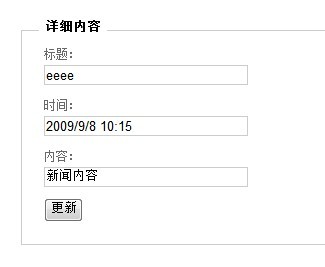
对应Edit的Action生成view,代码如下:
<%@ Page Title="" Language="C#" MasterPageFile="~/Views/Shared/Site.Master" Inherits="System.Web.Mvc.ViewPage<MvcCompany.Models.news>" %><asp:Content ID="Content1" ContentPlaceHolderID="TitleContent" runat="server"> 编辑</asp:Content><asp:Content ID="Content2" ContentPlaceHolderID="MainContent" runat="server"> <h2 style ="text-align :left ;">编辑</h2> <%= Html.ValidationSummary("Edit was unsuccessful. Please correct the errors and try again.") %> <% using (Html.BeginForm()) { %> <fieldset> <legend>详细内容</legend> <p> <label for="title">标题:</label> <%= Html.TextBox("title", Model.title) %> <%= Html.ValidationMessage("题目", "*")%> </p> <p> <label for="datetimes">时间:</label> <%= Html.TextBox("datetimes", String.Format("{0:g}", Model.datetimes)) %> <%= Html.ValidationMessage("时间", "*") %> </p> <p> <label for="contents">内容:</label> <%= Html.TextBox("contents", Model.contents) %> <%= Html.ValidationMessage("内容", "*")%> </p> <p> <input type="submit" value="更新" /> </p> </fieldset> <% } %> <div> <%=Html.ActionLink("Back to List", "Index") %> </div></asp:Content>
如果要单击“更新”返回数据新数据,还需要我们写如下一个Action:
[AcceptVerbs(HttpVerbs.Post)] public ActionResult Edit(int id,FormCollection formValuews) { news Sig_news = DCDC.news.Single(newss => newss.ID == id); try { Sig_news.title = formValuews.GetValue("title").AttemptedValue; Sig_news.datetimes = DateTime.Parse(formValuews.GetValue("datetimes").AttemptedValue); Sig_news.contents = formValuews.GetValue("contents").AttemptedValue; DCDC.SubmitChanges(); return RedirectToAction("Index"); } catch { foreach (var v in Sig_news.GetRuleViolations()) { ModelState.AddModelError(v.PropertyName,v.ErrorMessage); } return View(Sig_news); } }
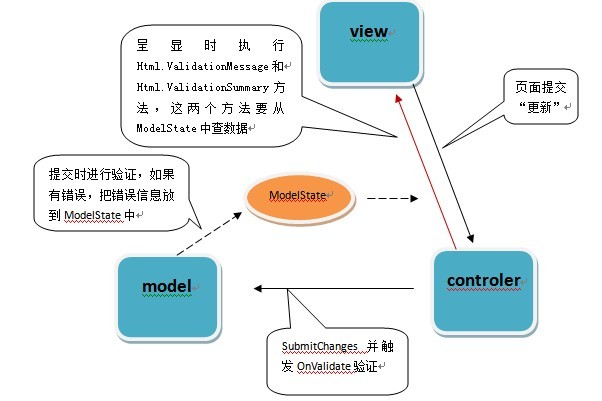
这个Edit的Action是用户提交返来更新数据库的,我们可以从formValuews得到用户在页面上更新的数据,来更新Sig_news对象,然后调用DCDC.SubmitChanges();去更新数据库,如果没有民常,会导航到index.aspx页面。如果发生异常,就会运行到catch里。如果还记得,在本文的前半部分,我们说到OnValidate,是数据在提交时应该验证,但在这里,我们并没有显示的调用OnValidate这个方法,但实际运行中,我们发现,这个方法被执行了,如果我们建立跟踪,把断点设在DCDC.SubmitChanges();如果我们数据有民常,会发现当DCDC.SubmitChanges();执行完后就会跳到partial void OnValidate(System.Data.Linq.ChangeAction action)这个方法,这是怎么做到的呢?我们猜测,一定是在数据提交时,调用OnValidate这个方法。为了找到它们的关系,只好用Reflector.exe来“探测”一下了(Reflector.exe的用法就不说了)。
SubmitChanges方法是DataContext的一个方法,这个类位于System.Data.Linq命空间下,用Reflector.exe打开SubmitChanges,看到this.SubmitChanges(ConflictMode.FailOnFirstConflict);定位这个方法,可以看到new ChangeProcessor(this.services, this).SubmitChanges(failureMode);定位查找会发现ValidateAll(orderedList);在这个方法中,多处看到 SendOnValidate(obj2.Type, obj2, ChangeAction.Insert);这个方法,再定位,有这样一行代码 type.OnValidateMethod.Invoke(item.Current, new object[] { changeAction });这里,正是通过反射调用了OnValidate这个方法。这样我们就找到了SubmitChanges执行时调用OnValidate的方法了(其不用调用OnValidate也可以验证用户数据,只需要写个方法,在SubmitChanges 提交以前执行就可以达到同样效果)。同时,当发生异常时,OnValidate会抛出一个Application的异常,这里会被public ActionResult Edit(int id,FormCollection formValuews)方法中的Catch捕获到,就执行如下代码:
foreach (var v in Sig_news.GetRuleViolations()) { this.ModelState.AddModelError(v.PropertyName,v.ErrorMessage); } return View(Sig_news);这行代码的意思是把错误的信息,以键值的方式放入ModelState中,ModelState是一个ModelStateDictionary类型,这个类型实现了IDictionary<string, ModelState>, ICollection<KeyValuePair<string, ModelState>>, IEnumerable<KeyValuePair<string, ModelState>>, IEnumerable这些接口(这里要注意,ModelState是当前对象的一个属性,并且它的AddModelError方法的第一个参数key有其独特的作用)。处理完异常后,还是返回当前页面。这时你会发现,在页面的 <%= Html.ValidationSummary("Edit was unsuccessful. Please correct the errors and try again.") %>发生了变化,把我们错误的地方去提示出来了,这里就是,为什么我们把错误信息放到ModelState中,而错误则显示在了Html.ValidationSummary中了呢?并且发生错误的数据后会加上了一个红色的“*”,这是怎么样做到的呢?
再次利用Reflector.exe,查看Html.ValidationSummary方法和Html.ValidationMessage方法,会发现它们显示的数据是从ModelState 中获取的,如果ModelState 这个集合中没有数据,Html.ValidationSummary和Html.ValidationMessage就返回空,如果发生异常,this.ModelState中有子项,就会通过Html.ValidationSummary和Html.ValidationMessage在页面页上显示出来。因为Html.ValidationMessage在页面上有多个,所以在this.ModelState.AddModelError(v.PropertyName,v.ErrorMessage);方法中的v.PropertyName就有了用处了,这个值要与<%= Html.ValidationMessage("题目", "*")%>中的第一个参数对应,这样<%= Html.ValidationMessage("题目", "*")%>才能起到作用,显示出第二个参数“*”。
这样一来,就达到了ASP.NET MVC的数据验证。由于ASPNET MVC 验证捌的弯比较多,所以下来用个图来说明一下。